
Administrative Distance and Why it's Important.
Administrative distance is important in networking because it serves as a mechanism for routers to make informed decisions about the reliability of routing information. That's only one reason it is important. Let's review what it could do in your network!
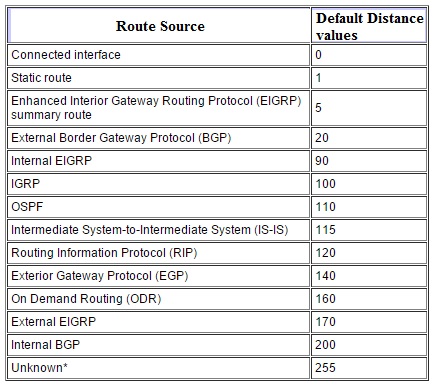
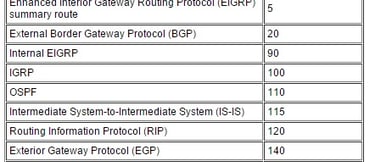
Administrative distance is a fundamental concept in networking that plays a crucial role in determining the path that a packet takes to reach its destination. It is a measure of the reliability and trustworthiness of a particular routing protocol or source of information. In this blog post, we will explore what administrative distance is, how it works, and how to troubleshoot common issues related to it. So...
What is Administrative Distance?
In networking, administrative distance (AD) is a metric used to differentiate between the reliability of routing information from various sources. The AD is a numerical value assigned to a routing protocol, which is used to compare the trustworthiness of information from different sources. The lower the administrative distance value, the more reliable the source of routing information.
Administrative distance values are used to resolve conflicts between routing protocols when multiple sources of routing information are available. When multiple routes to the same destination exist, the router will choose the route with the lowest administrative distance value.
How does Administrative Distance work?
When a router receives routing information from different sources, it compares the administrative distance values of each route to determine the most reliable source of information. The router then selects the route with the lowest administrative distance value and adds it to the routing table.
For example, if a router receives two routes to the same destination from two different sources, it will compare the administrative distance values of each route. If the administrative distance of the first route is 100 and the administrative distance of the second route is 200, the router will select the first route as the most reliable source of information.
Common Issues related to Administrative Distance
Here are some common issues related to administrative distance and how to troubleshoot them:
Routing Loops: Routing loops can occur when there is a mismatch in administrative distance values. If two or more routers have the same administrative distance value, packets may continuously loop between the routers, causing a network outage. To troubleshoot this issue, check the administrative distance values of the routing protocols and ensure that they are unique.
Incorrect Routing: If a router is not using the expected route, it may be due to an incorrect administrative distance value. Ensure that the administrative distance value for the routing protocol is correctly configured on the router.
Slow Network Performance: If network performance is slow, it may be due to routing issues. Verify that the routing protocols are correctly configured, and the administrative distance values are set appropriately.
Inconsistent Routing: Inconsistent routing may occur when a router receives different routing information from different sources with conflicting administrative distance values. To troubleshoot this issue, check the administrative distance values of the routing protocols and ensure that they are set appropriately.
Administrative distance is a critical concept in networking that determines the reliability and trustworthiness of routing information. By understanding how it works and how to troubleshoot common issues, you can ensure that your network is functioning correctly and that packets are reaching their intended destinations efficiently.
Here are some Cisco router CLI examples that you can use to configure administrative distance:
1. View the Administrative Distance of Routing Protocols
To view the administrative distance of routing protocols on a Cisco router, use the following command:
wndrlanrtr#show ip protocols
This command will display a list of routing protocols and their associated administrative distance values.
2. Configure Administrative Distance for a Routing Protocol
To configure administrative distance for a routing protocol on a Cisco router, use the following command:
wndrlanrtr(config)# distance {distance} {routing protocol}
Replace `{distance}` with the desired administrative distance value, and `{routing protocol}` with the name of the routing protocol.
For example, to set the administrative distance of the OSPF routing protocol to 110, use the following command:
wndrlanrtr(config)# distance 110 ospf
3. Verify Administrative Distance Configuration
To verify the administrative distance configuration of a routing protocol on a Cisco router, use the following command:
wndrlanrtr#show ip route
This command will display the routing table, including the administrative distance values for each route.
4. Configure a Backup Route with a Higher Administrative Distance
To configure a backup route with a higher administrative distance on a Cisco router, use the following command:
wndrlanrtr(config)# ip route {destination network} {subnet mask} {primary next-hop IP address} {AD} {backup next-hop IP address}
Replace `{destination network}`, `{subnet mask}`, `{primary next-hop IP address}`, `{AD}`, and `{backup next-hop IP address}` with the appropriate values.
For example, to configure a backup route with an administrative distance of 200 for the 10.0.0.0/24 network with a primary next-hop of 192.168.1.1 and a backup next-hop of 192.168.2.1, use the following command:
wndrlanrtr(config)# ip route 10.0.0.0 255.255.255.0 192.168.1.1 100 192.168.2.1 200
These examples should help you get started with using administrative distance on Cisco routers!
In summary, administrative distance is a metric used in routing protocols to determine the reliability and trustworthiness of routing information. It is a value assigned to each routing protocol, and the lower the value, the more reliable the protocol is considered to be.
When troubleshooting network issues related to routing, it is important to understand administrative distance and how to configure it properly. This can involve viewing and configuring the administrative distance of routing protocols, verifying the configuration, and configuring backup routes with higher administrative distances to ensure reliable routing in case of failures.
Some Cisco router CLI examples that can be used to work with administrative distance include using the show ip protocols command to view administrative distance values of routing protocols, configuring administrative distance for a routing protocol using the distance command, verifying the configuration using the show ip route command, and configuring a backup route with a higher administrative distance using the ip route command.